
Data stays on your device
- Journalit
- Yes
- Web journals
- No
- Spreadsheets
- Yes
Auto-sync trades, review mistakes, and keep your journal on your device.
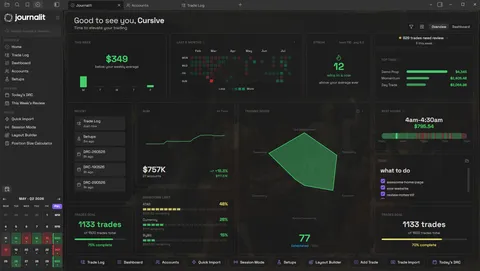


Most trading journals make your trades feel like rented data. You pay every month to access your own history, and one pricing change can turn your workflow upside down.
Journalit works differently. Your journal stays on your device & is built around the way you review trades instead of someone else's rigid template.
If a platform changes, locks exports, or disappears, your trading history should not disappear with it. Your journal should outlive the app you used to write it.
Plan the session, sync the trades, and review what actually happened.
Open Journalit and see what needs attention.
Reviews, goals, streaks, trades, and the next thing to fix. No digging before you even start.
Home view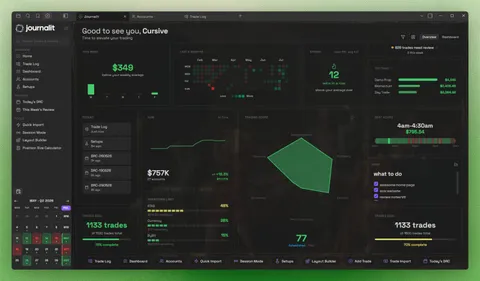
Reduce repetitive post-session data entry.
Connect a supported Trade Sync provider for ongoing updates, or use Trade Import with supported broker exports and statements.
Trading PlatformsStop checking the firm dashboard mid-session.
Track drawdown, daily loss, profit targets, and payout rules for each phase, with firm profiles to set them up.
Prop Challenges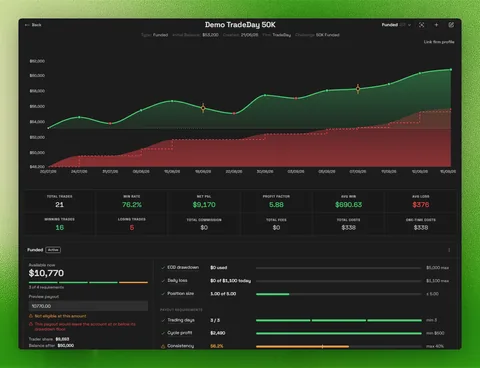
Build the review once. Reuse it when it matters.
Create the daily report card or weekly review you actually want to fill out, then stop starting from a blank page.
Templates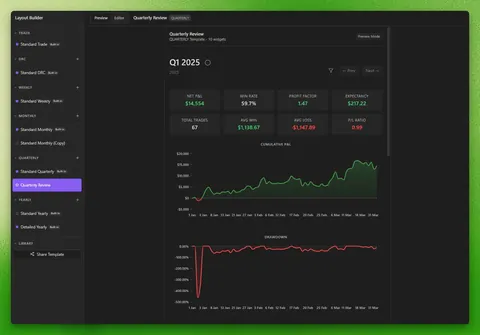
See what is helping and what is hurting.
See which setups, sessions, symbols, and habits are helping or hurting your performance.
Analytics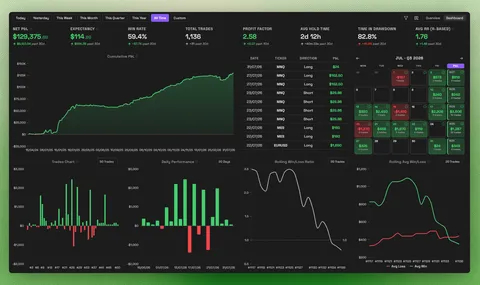
Turn a trade label into a playbook you can test.
Define the rules, connect the trades, then compare performance, missed opportunities, and execution against the backtest.
Explore Setups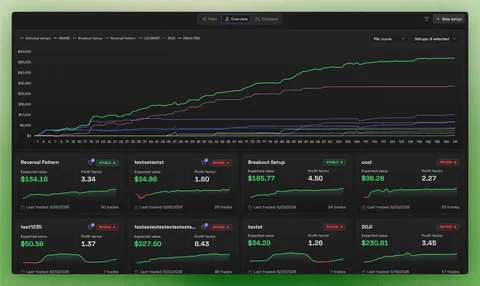
Import years of history without typing it all back in.
Use supported broker imports or map your own file when the export is messy.
Trade Import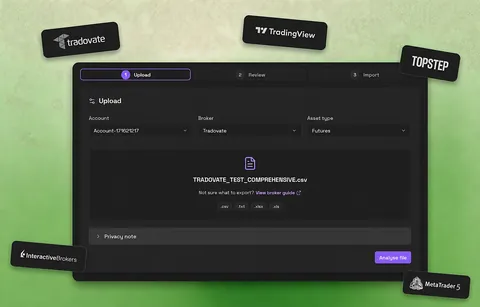
Rules are easy before the entry.
Session Mode keeps preparation, live notes, Trade Gate checks, and session review in one focused workspace.
Session Mode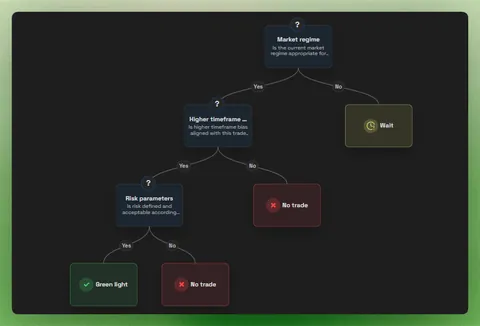
Most tools make you choose between control and convenience. Journalit is built so you do not have to.
| Feature | Journalit | Web journals | Spreadsheets |
|---|---|---|---|
| Data stays on your device | Yes | No | Yes |
| Built-in trading analytics | Yes | Yes | Manual |
| Auto-sync trades | Pro | Varies | No |
| Custom review workflow | Yes | Limited | Manual |
| Works without internet | Yes | No | Yes |
Want the detailed breakdown? Compare Journalit with other trading journals
See what our community has to say

“So happy with the journal; Notion is a headache.”
“This is the trading journal I've been searching for. MetaTrader connections are rock-solid across all my accounts, completely seamless.”

“Probably one of the best-looking and straightforward trading journals I've ever used.”

“Kudos for creating such a beautiful journal that helps you track each minute detail of your trades.”

“Thanks again, especially for such quick support. I'm going to recommend it to everyone, including my trading community.”

“Literally the most organized and low friction trading journal I have ever used. I'm enjoying journaling more than ever!”

“Such a good implementation and way better for me than something like TradeZella.”

“Your data stays in a portable format you own. Complete customization, no vendor lock-in.”

“The experience has been wonderful since I was doing basic journaling in Excel prior. Love it.”

“Local data, privacy, and markdown flexibility make it easy to organize and review my trades.”

“In Journalit, I can just sync and it's easy!”

“One stop shop for all my daily trading needs. Organized very well and has great support via Discord.”

“This is amazing and more than I would have hoped to find.”

“I have been using Journalit! for a while and I really enjoy it.”

“I tried to build something similar, and I almost succeeded - but it wasn’t anywhere near this level!”

“Since I started using Journalit, logging my trades stopped being a tedious task. It's such a relief not having to fill out spreadsheets or waste time copying data.”

“I've been looking for an alternative to the overpriced mainstream journals, and this looks perfect.”

“Local data storage lets me analyze my trades offline with all the analytics, while keeping my data my own.”

“I'm already liking how flexible your journal is. Thanks for your work!”

“Your plugin turned out to be exactly what I needed and has made recording my trades so much easier.”

“Bro this journal is goated, everything is perfectly detailed, I love it!”
Testimonials appearing on this website may not be representative of other clients or customers and are not a guarantee of future performance or success.
Free includes unlimited trades, accounts, and analytics. Pro adds Trade Import, automatic Trade Sync, the Economic Calendar, and prop-firm profiles.
Manual journaling, flexible reviews, and analytics on your device.
Billed annually at $180/year
Skip the spreadsheet cleanup. Sync and import trades into the journal you already review.
Everything you need to know about Journalit
The free plan includes unlimited trades, accounts, custom fields, and analytics. Local journalling features work offline in your Obsidian vault. Pro adds Trade Import, automatic Trade Sync for supported brokers, the Economic Calendar, and prop-firm profiles that prefill challenge rules.
Your journal notes are stored locally in your Obsidian vault as markdown files. Network-backed features send only the credentials, provider identifiers, broker reports, or trade data required for the workflow you choose. Your manual notes and analysis remain in your vault.
Journalit is local-first. You can create trades, write notes, view local analytics, and customise your journal without an internet connection. Trade Sync, authentication and other network-backed features require connectivity.
Pro includes Trade Import for supported broker exports and automatic Trade Sync for supported brokers. You can also add trades manually from any platform.
Not at all! Journalit is designed for traders, not developers. Everything is point-and-click with an intuitive interface built right into Obsidian. If you can use Obsidian, you can use Journalit. No coding, no command line, no technical setup required.
Yes. Add unlimited trading accounts, view each account separately, or combine selected accounts in portfolio analytics. Configured accounts can be managed in the same vault.
Journalit stores journal notes as markdown in your Obsidian vault and combines them with analytics, review workflows, and optional broker automation. The free plan does not impose a trade-count limit.
Your journal notes are stored as markdown files that can be read with a text editor, copied to another device, backed up, or processed with scripts. Some plugin-managed metadata may still require interpretation by compatible tools.
Still have questions? View full documentation or join our Discord
Futures and forex trading contains substantial risk and is not for every investor. An investor could potentially lose all or more than the initial investment. Risk capital is money that can be lost without jeopardizing one’s financial security or lifestyle. Only risk capital should be used for trading and only those with sufficient risk capital should consider trading. Past performance is not necessarily indicative of future results.
Hypothetical performance results have many inherent limitations, some of which are described below. No representation is being made that any account will or is likely to achieve profits or losses similar to those shown; in fact, there are frequently sharp differences between hypothetical performance results and the actual results subsequently achieved by any particular trading program. One of the limitations of hypothetical performance results is that they are generally prepared with the benefit of hindsight. In addition, hypothetical trading does not involve financial risk, and no hypothetical trading record can completely account for the impact of financial risk of actual trading. for example, the ability to withstand losses or to adhere to a particular trading program despite trading losses are material points that can also adversely affect actual trading results. There are numerous other factors related to the markets in general or to the implementation of any specific trading program that cannot be fully accounted for in the preparation of hypothetical performance results and all which can adversely affect trading results.
